A query set lets you build a result in named steps, all in one tab: each query can read the results of the ones above it, independent queries run at the same time, and every result gets a tab of its own. Save the set and you can run the whole thing again in one go. It's the tidiest way to turn a long script into something you can rerun and share, and the same query sets work in LumiCode.
Prerequisites
Access to the Luminesce Query Editor in the LUSID web app, under Data Virtualisation > Query Editor.
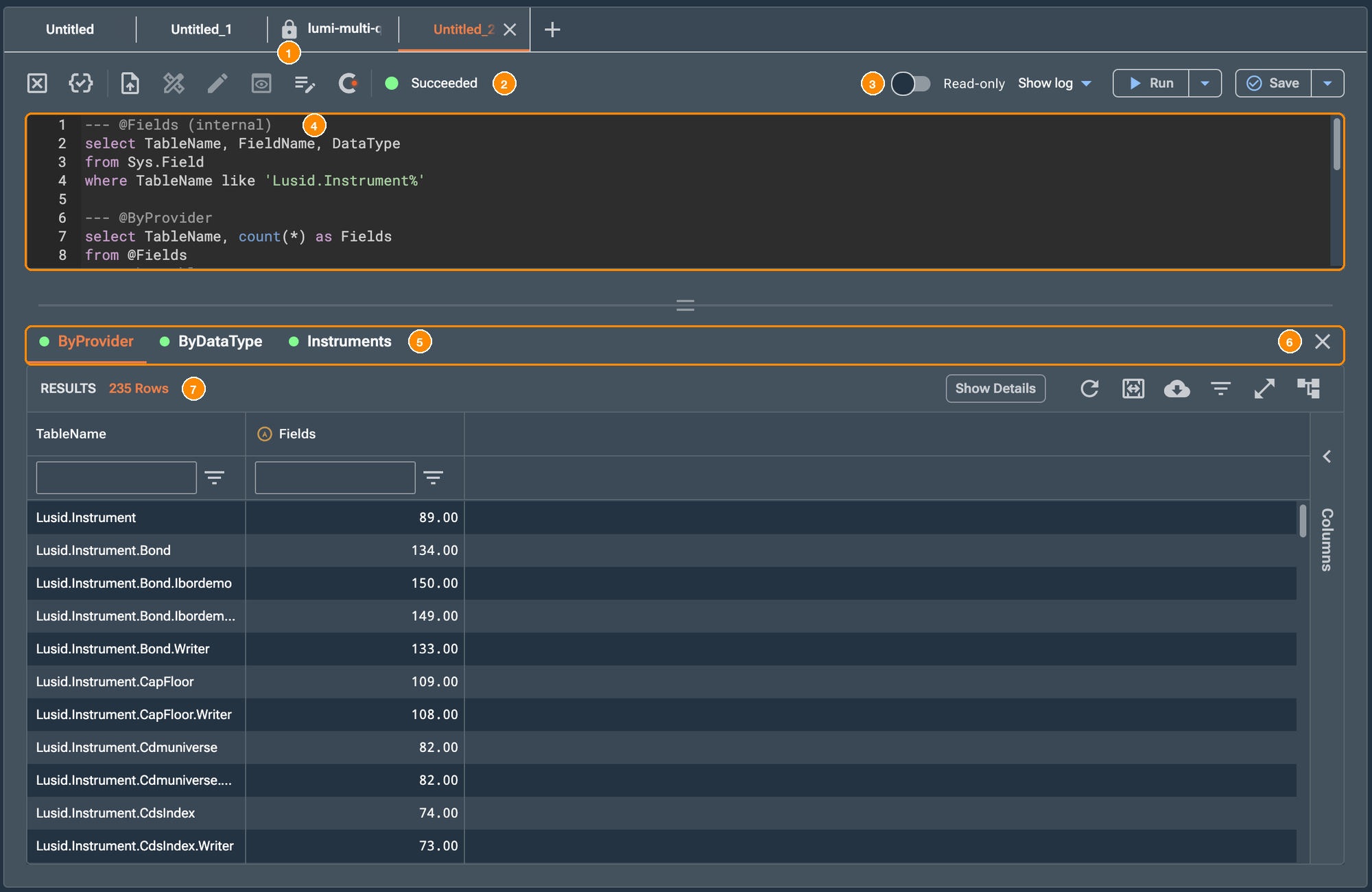
# | What it is |
|---|---|
Writing and running a query set | |
1 | A lock on a tab means its query is read-only. A saved query set you open with Run from the Saved Queries page starts read-only. |
2 | The run status covers the whole set. |
3 | Read-only: turn it on to lock the set so it can't be changed by accident, or off to edit it. |
4 | Each |
Its results | |
5 | A tab for each query with a result, its status shown by the dot. The internal |
6 | Close the results of the whole set. |
7 | The selected query's results, in the usual grid. |
Method
Step 1: Write the queries
In a tab, start each query with a header line, --- @Name. Everything up to the next header is that query's SQL.
--- @Fields (internal)
select TableName, FieldName, DataType
from Sys.Field
where TableName like 'Lusid.Instrument%'

--- @ByProvider
select TableName, count(*) as Fields
from @Fields
group by TableName

--- @ByDataType
select DataType, count(*) as Fields
from @Fields
group by DataType

--- @Instruments
select LusidInstrumentId, DisplayName
from Lusid.Instrument
where DisplayName like :name:'%Bond%'
limit 20
In this example:
@ByProviderand@ByDataTypeboth read@Fields, so they wait for it, then run at the same time.@Instrumentsreads nothing, so it starts straight away.(internal)marks@Fieldsas a step that only feeds the others. It runs, but has no results of its own to show or save.:name:'%Bond%'is a scalar parameter with a default value. The Query Editor asks for its value when the set runs. See How do I use parameters in a query?
As you type, autocomplete offers the queries above as @Name, and the editor underlines any problem with the set on its line. Pretty print lays out each query on its own.
Step 2: Run the set
Select Run, or press Shift+Enter.
If any query has parameters, enter their values. You're asked once for the whole set, and the values you used last time are filled in.
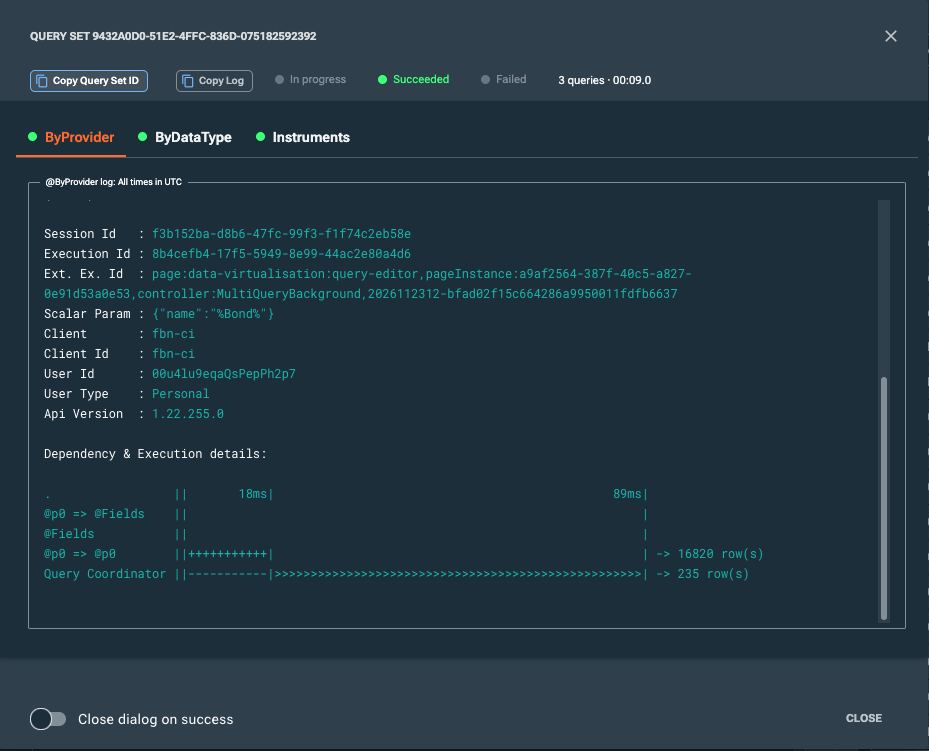
If the log menu is on Show log, a progress window opens, with a tab for each query showing its status and its own log. From it you can Copy Query Set ID, Copy Log, or select Cancel query set to stop the whole set.
If a query fails, the queries that read it are skipped, and the rest still run.
The Execution concurrency setting, on the Data Virtualisation > Settings page, decides how many queries of a set run at once. See Query Editor settings reference.
Step 3: Explore the results
Each query that has a result gets a tab under the editor, named after the query. The dot on each tab shows how it went: Waiting, Running, done, failed, Skipped because a query it reads didn't succeed, or Cancelled.
Each result is an ordinary results grid, so you can format, filter, group and total it as usual. See How do I format results? and How do I filter, group and total results? The set keeps how each result is shown.
A query that uses a Saved Query is shown the way that Saved Query is shown.
To close the results of the whole set, select Close to the right of the result tabs.
Step 4: Save the set
Select Save. The set is saved to Workspaces as a query set, with how each of its results is shown. To open it again, select + and then Saved Queries, or find it on the Saved Queries page, where it's listed with its queries. See How do I save, open and share queries?
Rules for writing a query set
Names start with a letter or
_, contain only letters, digits and_, are at most 31 characters, and must be unique (case is ignored).A query can only read queries above it.
A set can hold at most 25 queries.
To include a Saved Query, write
--- @Name = {visibility}/{workspace}/items/{group}/{name}on one line, with nothing under it.Not allowed: a query with no SQL, and a line of just
\, because the headers already split the queries.
What a query set can't do yet
A query set can't be scheduled from the Query Editor, and the query, writer and view designers aren't available for it. Schedule or design each query on its own instead.
Related articles
How do I run several queries together as a multi-query?, for query sets in LumiCode