Every setting on the Data Virtualisation > Settings page, what it does and its default. Settings belong to your LUSID user, so they follow you to any browser. A change is saved as soon as you make it.
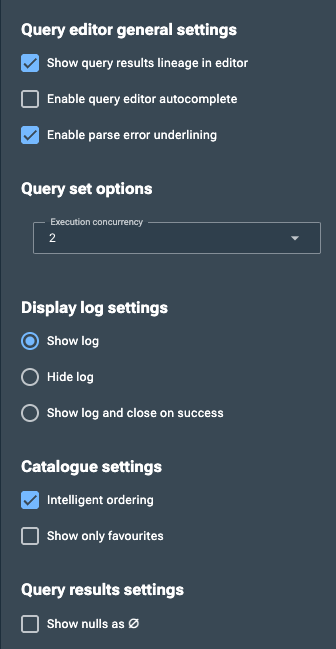
Query editor general settings
Setting | Default | What it does |
|---|---|---|
Show query results lineage in editor | On | Asks Luminesce how each result was put together. Lineage gives you Show table lineage, the Calculation and Aggregation markers and Explain on columns, and links in results. A change applies to queries you run afterwards. See How do I see where a value in my results came from? |
Enable query editor autocomplete | On, unless your domain has a different default | Suggests providers, fields and functions as you type. See How do I write queries faster in the Query Editor? |
Enable parse error underlining | On, unless your domain has a different default | Underlines mistakes in your SQL as you type, before you run it. |
For the two settings that have a domain default, your own choice overrides it once you change it.
Query set options
Setting | Default | What it does |
|---|---|---|
Execution concurrency | 2 | How many queries of a query set can run at once, from 1 to 5. A query that reads another query's results still waits for it. See How do I run several queries together as a query set? |
Display log settings
Choose one. The same choice is offered beside Run in the Query Editor. See How do I run a query and follow its progress?
Setting | Default | What it does |
|---|---|---|
Show log | Selected | Shows the query log while a query runs, and keeps it open afterwards. |
Hide log | Doesn't show the log while a query runs. | |
Show log and close on success | Shows the log while a query runs, and closes it when the query succeeds. If the query fails, the log stays open. |
Catalogue settings
Setting | Default | What it does |
|---|---|---|
Intelligent ordering | On | Lists providers and views alphabetically. Turn it off for the classic order, grouped by category. |
Show only favourites | Off | Lists only the providers and views you've marked as favourites. |
The same two settings are in the Catalogue's own menu in the Query Editor. See How do I find providers and fields in the catalogue?
Query results settings
Setting | Default | What it does |
|---|---|---|
Show nulls as ∅ | Off | Shows empty (null) values, and groups of them, as ∅ instead of leaving them blank, so you can tell an empty value from an empty string. |
Also remembered for you
The Query Editor also remembers these without a setting:
The width of the Catalogue and the height of the editor above the results, when you drag them.
Your favourite providers and views.
Whether Show all is selected on the History page.
Related articles
LumiCode Commands, where /set covers LumiCode's own settings