A parameter turns one query into many. Instead of editing a portfolio code or a date every time you run a query, mark it as a parameter, and the Luminesce Query Editor asks for the value each time you run it, with a date picker, a list to choose from, or a box to type in. Save the query, and everyone you share it with gets the same prompt.
Prerequisites
Access to the Luminesce Query Editor in the LUSID web app, under Data Virtualisation > Query Editor.
Methods
Method 1: Add a parameter and run the query
In your query, replace a value with
:<name>:<default>. Put the name in square brackets if it has spaces in it. The default value sets the parameter's type, so#2024-01-01#makes it a date and1000makes it a number.Run the query.
In the Parameters dialog, check or change each value, then select Run.
For example, this query asks for a portfolio scope, a date and a minimum amount:
select TxnId, PortfolioCode, TransactionDate, TotalConsideration
from Lusid.Portfolio.Txn
where PortfolioScope = :[Portfolio scope]:'Finbourne-Examples'
  and TransactionDate > :After:#2024-01-01#
  and TotalConsideration > :[More than]:1000
The dialog lists each parameter with its Name, Data Type and Value, and gives you the right control for each type, such as a date picker for a date.
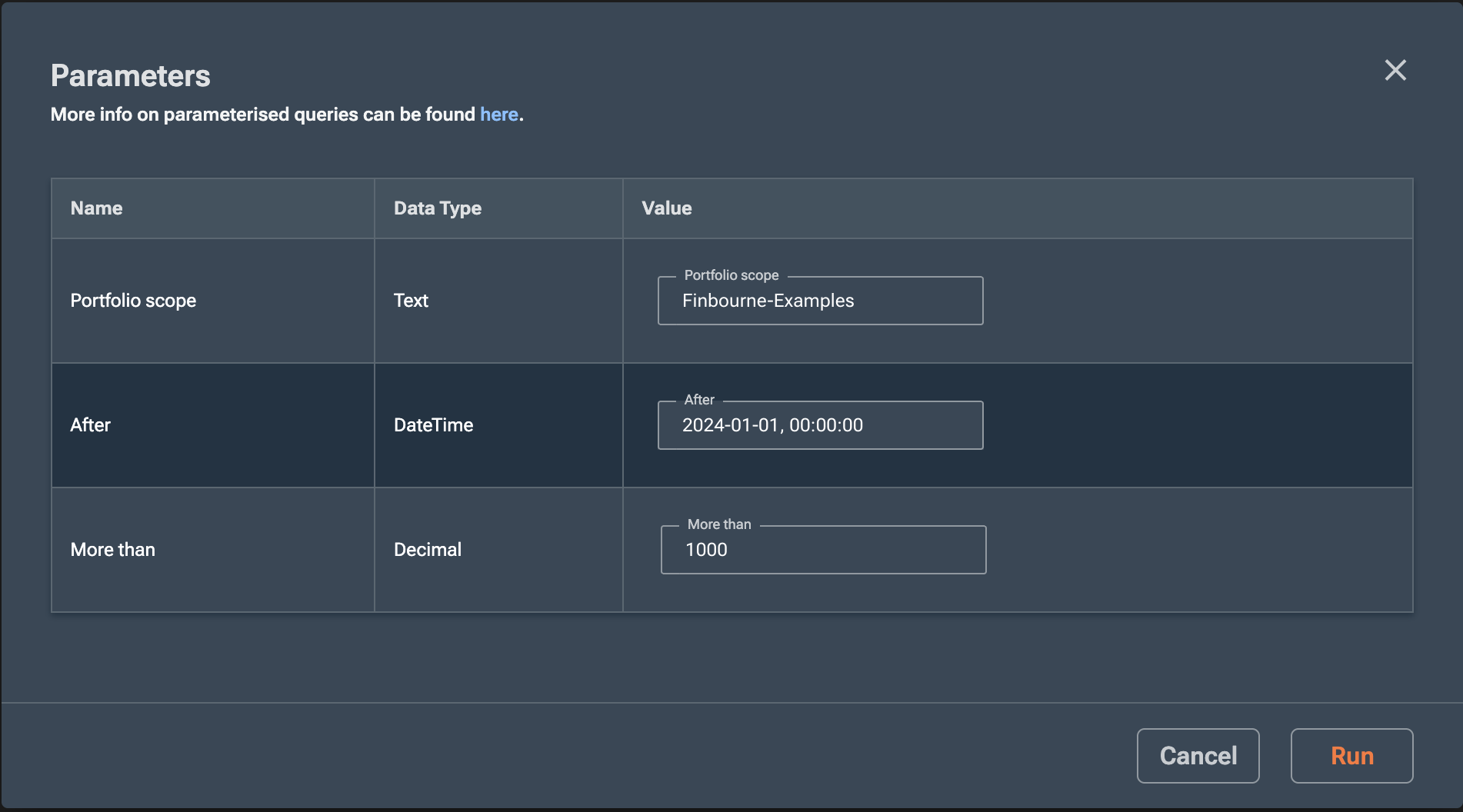
Select Cancel to go back to the editor without running the query.
Method 2: Offer a list of values
To let people pick a value rather than type one, list the values in curly brackets. The first is the default:
select TxnId, PortfolioCode, TradeCurrency, TotalConsideration
from Lusid.Portfolio.Txn
where PortfolioScope = 'Finbourne-Examples'
  and PortfolioCode = :[Choose fund]:{'UK-Equities', 'US-Equities'}
  and TradeCurrency = :[Trade currency]:{'GBP', 'USD', 'EUR' *}
Without a
*, the value must be one from the list, as forChoose fund.With a
*before the closing bracket, people can pick from the list or type their own value, as forTrade currency.
The list can also come from a query, so it's always up to date. Put the query in round brackets inside the curly ones:
select PortfolioCode, DisplayName, BaseCurrency
from Lusid.Portfolio
where PortfolioScope = :[Portfolio scope]:{(select distinct PortfolioScope from Lusid.Portfolio order by 1) *}
For every form a parameter can take, including a type with no default, see Understanding the Luminesce SQL query syntax.
Method 3: Use parameters in query sets, saved queries and history
Query sets: when you run a query set, the dialog asks for every parameter in every query in the set at once. A parameter with the same name in several queries is asked for once, and every query gets the same value. The dialog starts with the values you used last time. See How do I run several queries together as a query set?
Saved queries: when you open a saved query from the Saved Queries page, its parameters appear above the results, so you can change a value and run it again. See How do I save, open and share queries?
History: re-running a past query that has parameters asks for their values again. See How do I find and re-run a past query?
A tool that doesn't ask for parameter values runs the query with the defaults.
Troubleshooting
Value must be one of the suggested options
The parameter only accepts a value from its list. Pick one from the list, or, if any value should be allowed, add * before the closing curly bracket in the query.
Error rendering query
The query that builds the parameter's list failed, and the message says why. You can still type a value. To fix the list, run the query in the round brackets on its own and correct it.
The dialog doesn't appear
Check the parameter's colons: it needs one before the name and one after it, as in :After:#2024-01-01#. A name with spaces needs square brackets, as in :[More than]:1000.