LumiCode changes often, and it keeps its own release notes, so the quickest way to see what's new is to ask LumiCode itself. It tells you when a newer version has something for you, shows you exactly what that is, and updates in one command.
Finding out what's new
Once a day, in an interactive session, LumiCode checks whether a newer version is available. When the newer version has release notes yours doesn't, the banner says how many, for example 3 new.
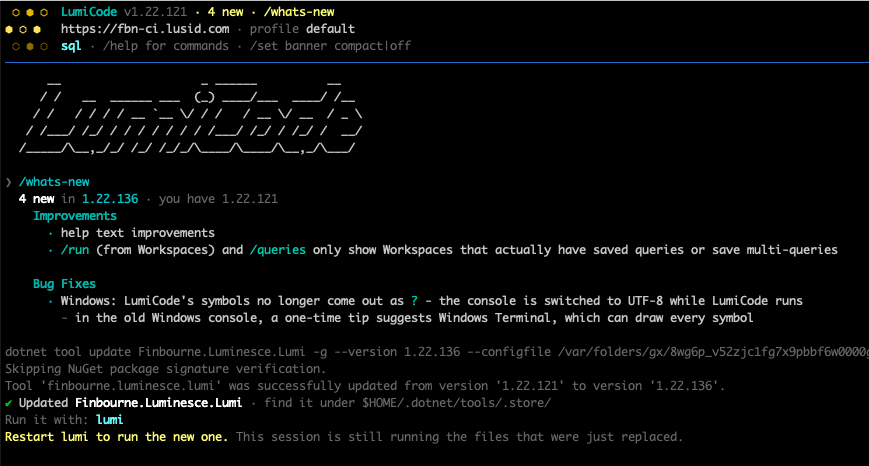
Type /whats-new to read them. LumiCode lists the changes the newer version would bring, newest first, then offers to update. If no check has run yet in this session, /whats-new checks straight away; otherwise it shows what the last check found, and when.
To stop the daily check, run /set update-check off. /whats-new and /update still work whenever you use them.
Seeing every change
/whats-new all prints every release note, newest first, without offering to update. It's a good way to catch up straight after you install LumiCode.
Each note is dated rather than numbered, because the dates are what tell you which changes you have.
Updating
Type /update. LumiCode downloads the newest version and installs it. Restart lumi afterwards to use it.
On Windows, LumiCode can't replace itself while it's running. Instead, /update downloads the new version and shows you the command to run after you exit.
Updating from a shell
To check for and take an update without starting an interactive session, for example from a script, run:
lumi updateLumiCode checks straight away and shows the same release notes as /whats-new. It then updates, but only if the newer version brings something new. To update to the latest version regardless, for example when the check can't tell whether there's anything new, add --force:
lumi update --forceAs with /update, on Windows LumiCode shows you the command to run rather than updating itself.
lumi update finishes with exit code 0 when LumiCode is up to date or has been updated, and 1 when the update failed or the check couldn't tell whether there was anything new.
Related articles
What's new in the Luminesce Query Editor, for the same task in the Luminesce Query Editor