Providers you host yourself, and the Luminesce CLI, normally reach Luminesce over AMQPS on port 5671. Plenty of corporate networks don't allow that. Hutch gets you connected anyway: it carries the same traffic over HTTPS on port 443, through your web proxy if you have one, so you can run providers behind a strict firewall without opening a new port.
Note: Hutch adds an extra service to every message's journey, so it can be slower and less reliable than a direct connection. Use it when you can't open port 5671; if you can, connect directly.
How Hutch works
Every provider host from FINBOURNE has a Hutch client built in. When you start a provider host with --viaProxy:
The Hutch client starts listening on port 5671 on the machine running the provider host.
The providers connect to that local Hutch client instead of to Luminesce.
The Hutch client opens a secure WebSocket over HTTPS (port 443) to the Hutch server in your LUSID domain, through your web proxy if you set one.
The Hutch server passes the traffic on to the Luminesce hub (RabbitMQ).
To your providers, nothing changes: they still speak AMQPS, and they still use your client certificate. Only the route across your network is different.
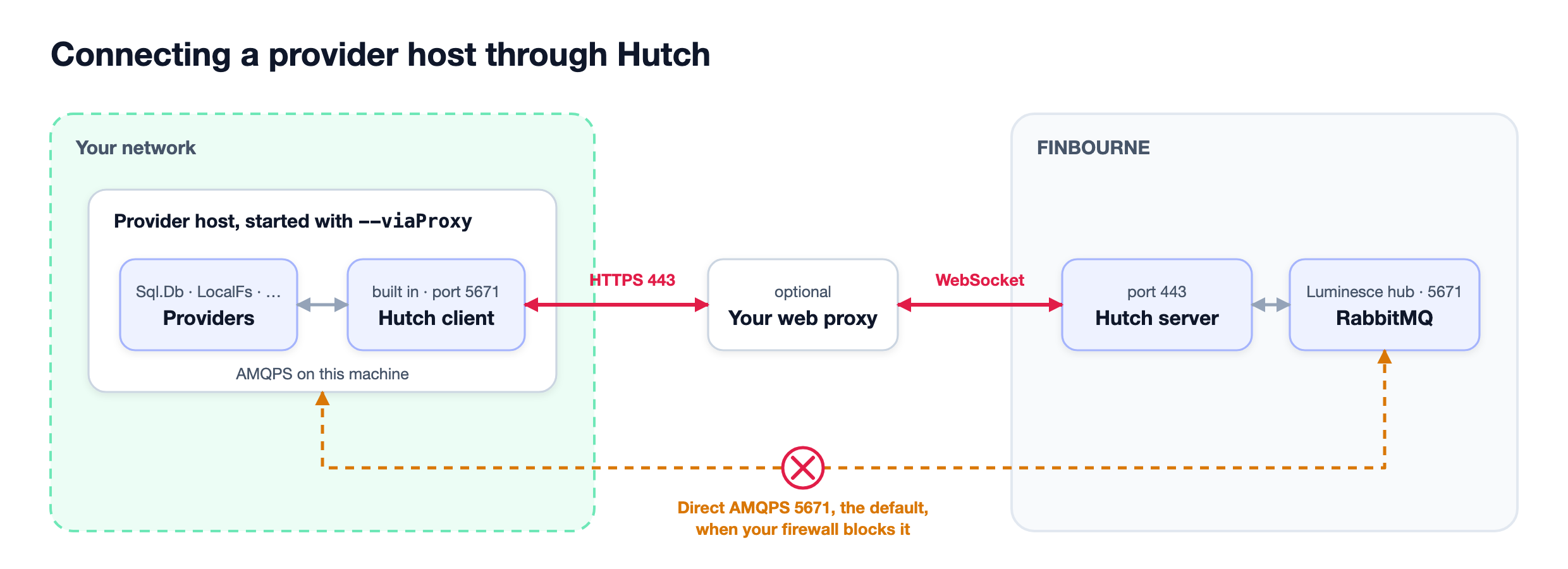
For where Hutch sits in the platform as a whole, see Understanding the Luminesce platform architecture.
Prerequisites
A provider host installed and working, or ready to run, for example Sql.Db or LocalFs, and its client certificate. See How do I download provider hosts, drivers and certificates?
Outgoing HTTPS on port 443 to
<your-domain>.lusid.com. See Understanding network dependencies for LUSID and Luminesce.Port 5671 free on the machine that runs the provider host, because the Hutch client listens on it.
Hutch enabled for your domain. The first time you use Hutch, it may need some set-up on the FINBOURNE side. Contact Technical Support before you start.
Methods
Method 1: Run a provider host through Hutch
If your network sends web traffic through a proxy, set the
FBN_PROXY_ADDRESSenvironment variable to its address before you start the provider host, for example:$env:FBN_PROXY_ADDRESS = "http://proxy.acmecorp.local:8080"Skip this step if your machine connects to the internet directly.
Start the provider host with the options you normally use, and add
--viaProxy. For example, for the Sql.Db providers:luminesce-database-providers.exe --routeAs=User --quiet --authClientDomain=<your-domain> --certificateFallback=DownloadMayMint --viaProxy...where
<your-domain>is the root of your LUSID domain, for exampleacmecorp. Hutch uses this domain to find your Hutch server.Check the provider host's log. A line like
TCP server running at: 0.0.0.0:5671shows that the Hutch client has started.In the LUSID web app, navigate to Data Virtualisation > Query Editor and refresh the catalogue. Your providers appear as usual.
Method 2: Run the Luminesce CLI through Hutch
The Luminesce CLI can connect straight to the query engine over AMQPS, so it hits the same blocked port. You have two ways round it:
Add
-p(or--viaProxy) to run your queries over AMQPS through Hutch, as a provider host does.FBN_PROXY_ADDRESSworks the same way.Add
-w(or--viaHttps) to send your queries to the Luminesce REST API instead. This doesn't use AMQPS at all.
Troubleshooting
The log says the TCP server can't run because the address is already in use
Another program on the machine is already listening on port 5671. If it's another provider host started with --viaProxy, that's fine: the new provider host shares its Hutch client. If you then stop the first provider host, the others lose their connection, so restart them.
If something else owns port 5671, stop it or run the provider host on a different machine.
The providers never appear in the catalogue
Check that the machine can reach
https://<your-domain>.lusid.com, and that your web proxy allows WebSocket connections to it.Check that
--authClientDomainnames your domain, and thatFBN_PROXY_ADDRESSis set if you need a proxy.If this is the first time you've used Hutch, check with Technical Support that it's enabled for your domain.
Queries are slower than before
Some extra time per message is the cost of the extra hop, it’s minor though. If the tiniest of performance differences matter, ask your network team about allowing outgoing connections on port 5671 and connect directly instead.