When you set or adjust holdings, LUSID treats your figures as the truth for that date. If you later load a transaction dated before that date, LUSID absorbs it into the true-up, and the position doesn't move.
That's correct when your figures already included the transaction. But sometimes a late transaction should change the position, such as a trade your old system missed, or a trade you cancel after migration. To make it count, you can stamp the transaction with the date of the set or adjust it should follow. LUSID then applies it straight after that set or adjust, so you don't have to book an offsetting adjustment by hand.
Consider the example of a portfolio migrated to LUSID by setting holdings on 31 December 2023: 200 shares at a cost of USD 2,000, and USD 5,000 of cash. After the migration, you discover a buy of 20 shares on 1 October 2023 that the old system missed, and you load it:
Holdings on 31 December 2023 | |
|---|---|
After setting holdings | 200 shares (cost 2,000), USD 5,000 |
After loading the late buy | 200 shares (cost 2,000), USD 5,000. The true-up absorbs the buy. |
After stamping the buy with 31 December 2023 | 220 shares (cost 2,200), USD 4,800. The buy applies after the set. |
Choosing a stamp
There are two stamps for transactions. Each is a built-in Transaction system property that is ready to use:
You want to... | Stamp | System property |
|---|---|---|
Apply a late transaction on top of the set or adjust | Transaction stamp |
|
Reverse a transaction you cancel late, after the set or adjust | Cancellation stamp |
|
The value of either stamp is the effective date of the set or adjust, for example 2023-12-31T00:00:00Z. Note the following:
The date must match a set or adjust that exists for the portfolio. Otherwise LUSID rejects the stamp.
If the date is an adjust, the stamp only has an effect if that adjust included the transaction's instrument, or the currency it settles in. An adjust leaves other instruments alone, so there's nothing to apply after.
For a cancellation stamp, stamp the transaction you're cancelling. You can stamp it before or after you cancel it.
Methods
Navigate to the portfolio's output transactions and view the late transaction. Alternatively, open its ⋮ menu and select SetHoldings stamps.
In the SetHoldings stamps section, select Apply SetHoldings stamp.
Choose the stamp type, and the set or adjust the transaction should follow. The dialog explains what will happen.
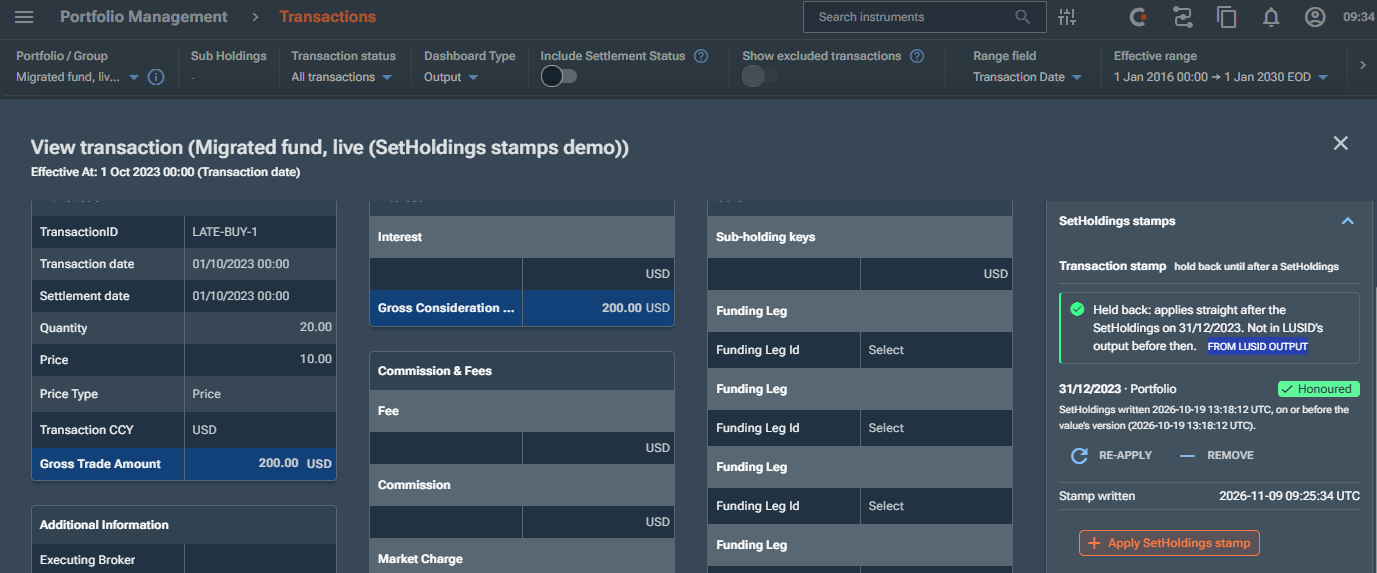
The SetHoldings stamp column shows what each stamp did, for example Held to 31/12/2023, Reversed after 31/12/2023 or Stamp voided.
Add the stamp property to the transaction. You can include it when you upsert the transaction, or add it later using the UpsertTransactionProperties API.
{
  "Transaction/default/AppliesAfterSetHoldingsDate": {
    "key": "Transaction/default/AppliesAfterSetHoldingsDate",
    "value": { "labelValueSet": { "values": [ "2023-12-31T00:00:00Z" ] } }
  }
}
To remove a stamp, call the DeletePropertiesFromTransaction API.
Checking the result
Holdings and output transactions show the result directly. In output transactions, a stamped transaction appears after the true-up for that date, and the true-up no longer absorbs it.
A cancelled transaction gets a reversal with the ID
<original ID>:cancel. Before the set or adjust date the original shows asPendingReversal; from that date it shows asReversed.To see why a stamp did or didn't take effect, ask the BuildTransactions API for the
Transaction/system/AppliesAfterSetHoldingsDateVerdictproperty, orTransaction/system/CancelAppliesAfterSetHoldingsDateVerdictfor a cancellation stamp:
Verdict | Meaning |
|---|---|
| Applied straight after this set or adjust |
| A cancellation whose reversal falls after the period you asked for |
| Valid, but a later stamped set or adjust releases the transaction |
| The set or adjust was redone or cancelled after you stamped, so the transaction is absorbed again (see below) |
| The stamp is dated before the transaction, so it has no effect |
| The stamp belongs to another portfolio, such as a different NAV type |
If you redo the set or adjust
If you set holdings again at the same date, or cancel the set, LUSID voids the stamps that point at it, and the late transactions are absorbed again. The response includes a SetHoldingsStampsVoided warning that lists them. Adjusting holdings again at that date voids stamps only for the instruments the adjust includes.
To restore a stamp, apply it again (in the web app, select Re-apply). LUSID checks it against the set or adjust as it is now.
Stamping settlement instructions
If the portfolio settles by instruction, a settlement can be late or wrong even when the transaction itself is right. For example, a payment was made before the migration, but the old system still showed it as pending. Settlement instructions have two equivalent stamps:
You want to... | Property | Set it... |
|---|---|---|
Apply a settlement that the set or adjust treated as still pending |
| On the instruction, when you load it with BatchUpsertSettlementInstructions |
Reverse a settled instruction you deactivate late |
| In the same BatchAmendSettlementInstructions call that deactivates the instruction |
You don't need to stamp the instructions of a stamped transaction; they follow the transaction automatically.
Letting LUSID stamp for you
You can set the Transaction/default/InclusionDate system property on a transaction, in which case LUSID stamps for you.
If the transaction’s trade date is before a set or adjust holdings but its inclusion date is after it, LUSID stamps it with the latest set or adjust in between, so it applies on top of that position rather than being absorbed by it.
Transaction/default/CancelInclusionDate does the same for cancellations, & settlement instructions have equivalent properties.